Your front door has two jobs now, and that is the whole reason this category got crowded. It has to let the right people in with a code or a finger, and it has to show you who is standing on the porch at 11pm. A video smart lock with camera does both in one piece of hardware, but the five models below go about it in very different ways. Some are full replacements that bundle a camera, a video doorbell, a fingerprint reader, and an indoor screen. One is a keypad-only deadbolt with no camera and no app at all. Another sits in the middle with 2K HDR video, face recognition, and an extra battery in the box.
If you are buying for a rental, a short-term rental, or your own front door, the differences that decide whether you are happy in month seven are not the ones printed on the front of the box. They are how many ways you can get in, what happens when the WiFi hiccups, whether the lock ships with the chime and battery you assumed were included, and whether the app asks you for a monthly fee before it will show you a live view.
This guide compares five models across that range, from a straightforward keypad deadbolt to a flagship all-in-one, and explains which one fits which door.
Related: Smart Lock Setup Order: Why the App Comes Before the Gateway
Quick answer
The S398 Video Smart Lock, 4-in-1 Fingerprint Door Lock with Camera & Video Doorbell is the strongest fit for a single front door that needs codes, a fingerprint, and camera video in one unit because it combines a Wi-Fi deadbolt, a fingerprint reader, a camera with video doorbell function, an indoor display monitor, app remote control, and an included chime, and the listing describes it as an easy-install 2026 upgrade. Choose the Schlage Electronic Keypad Deadbolt Lock, Camelot Trim, Aged Bronze instead when you want a keypad deadbolt only, with no camera, no WiFi pairing step, and no app to keep alive.
Video smart locks with cameras worth comparing
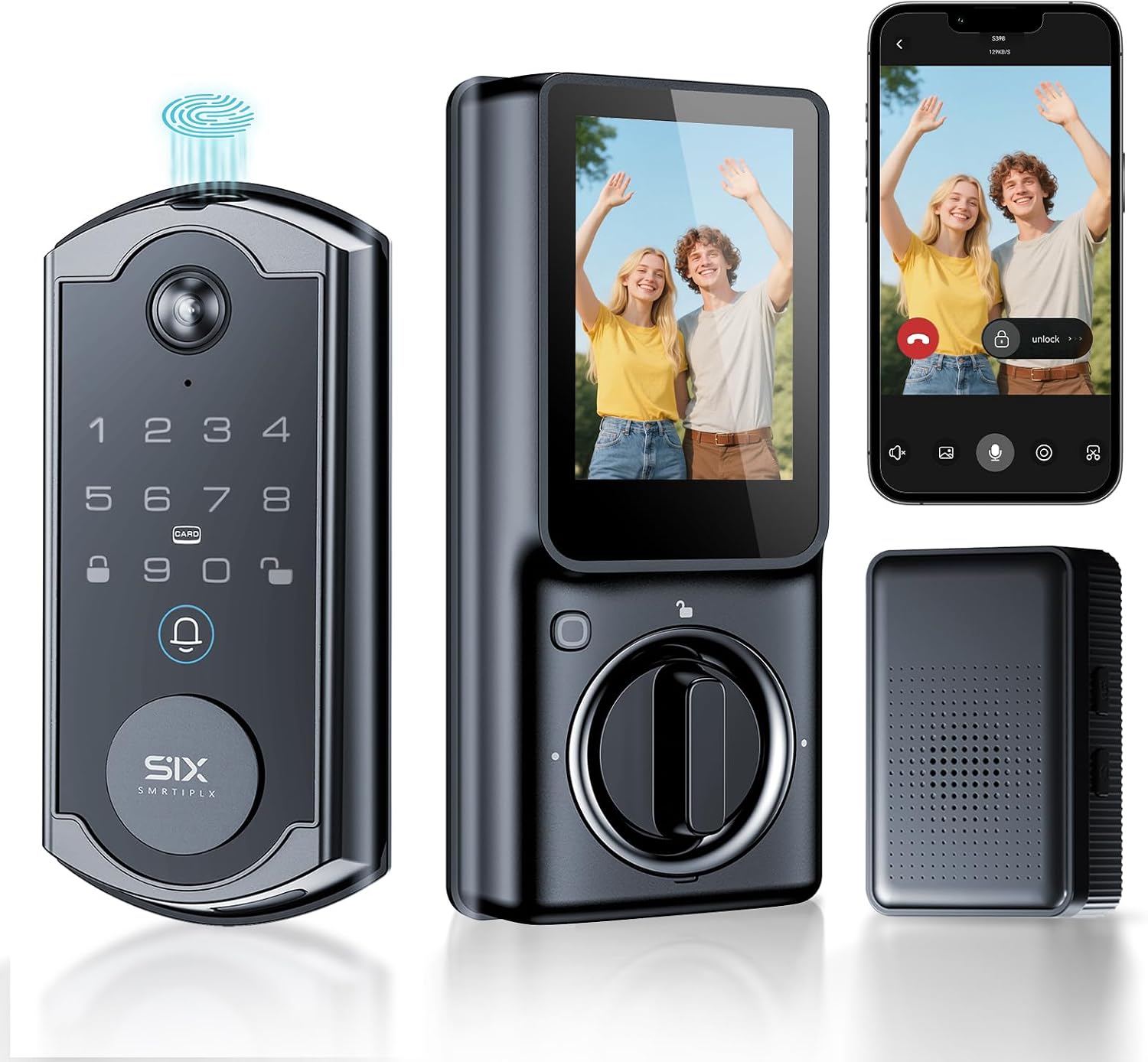
S398 Video Smart Lock, 4-in-1 Fingerprint Door Lock with Camera & Video Doorbell, Wi-Fi Deadbolt, Indoor Display Monitor, App Remote Control, Easy Installation, Chime Included-2026 Upgrade
A 4-in-1 fingerprint door lock that pairs a camera and video doorbell with a Wi-Fi deadbolt, adds an indoor display monitor and app remote control, and includes a chime. The listing positions it as a 2026 upgrade built for easy installation.
Visit on Amazon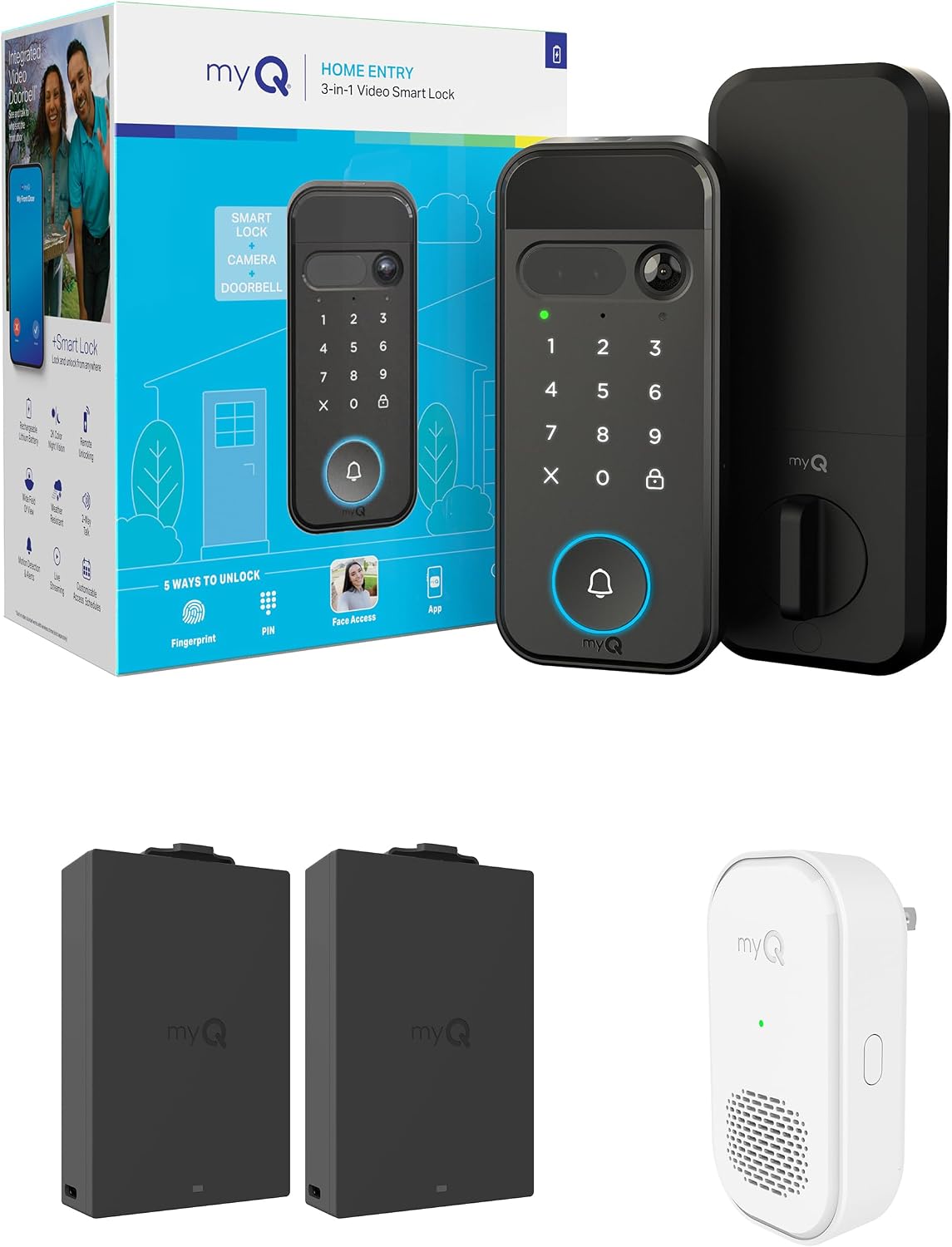
myQ Secure View™ 3-in-1 Smart Lock Deadbolt + myQ Chime + Extra Battery, Keyless Entry Lock, 2K HDR Doorbell Camera, Face, Fingerprint & PIN Access, App Control, Color Night Vision & Two-Way Audio
A 3-in-1 smart lock deadbolt bundled with a myQ Chime and a spare battery. It lists a 2K HDR doorbell camera, face, fingerprint, and PIN access, app control, color night vision, and two-way audio.
Visit on Amazon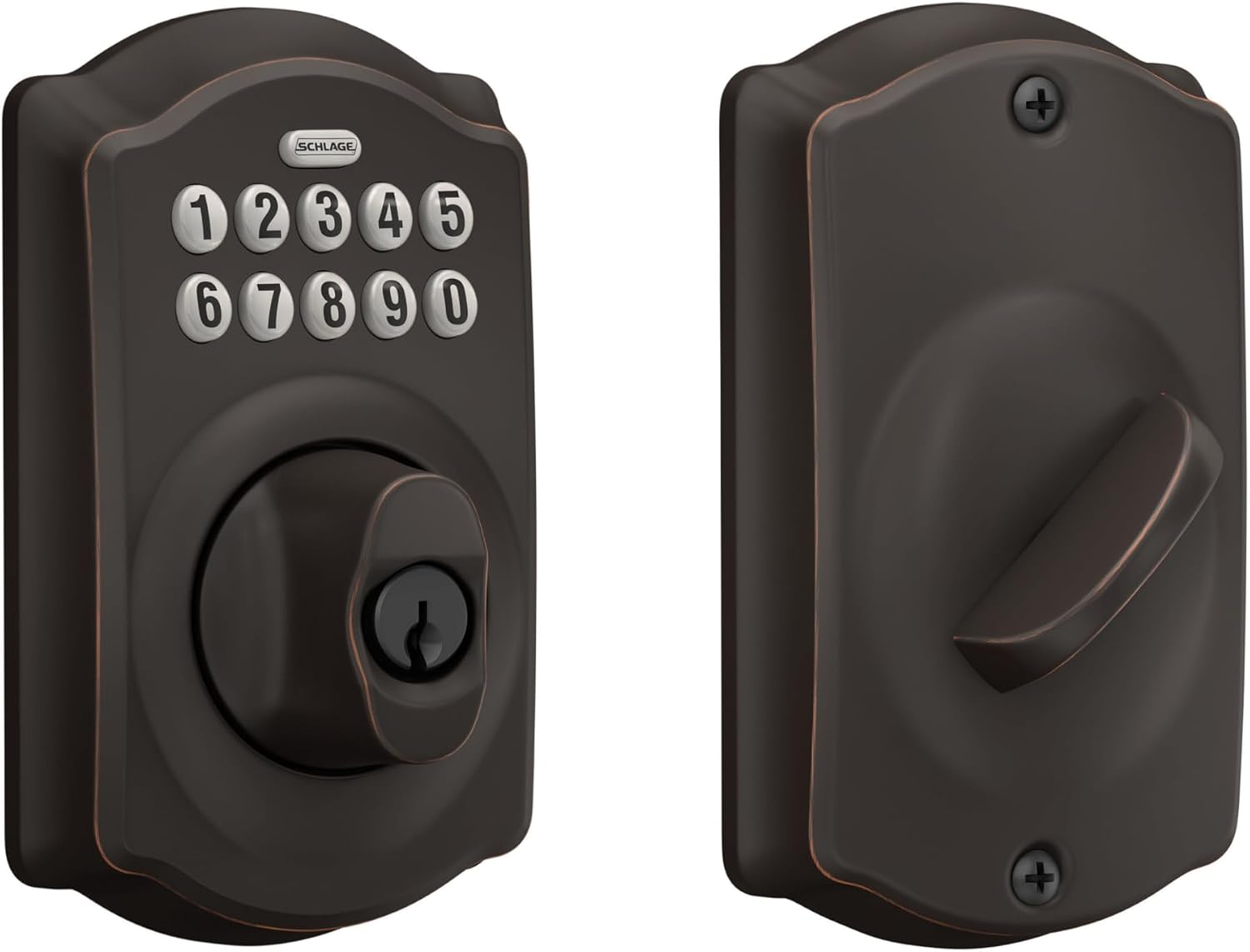
Schlage Electronic Keypad Deadbolt Lock, Camelot Trim, Aged Bronze
An electronic keypad deadbolt in the Camelot trim with an aged bronze finish. No camera, no doorbell, no app dependency: just a keypad code on a deadbolt for buyers who want the simplest possible entry upgrade.
Visit on Amazon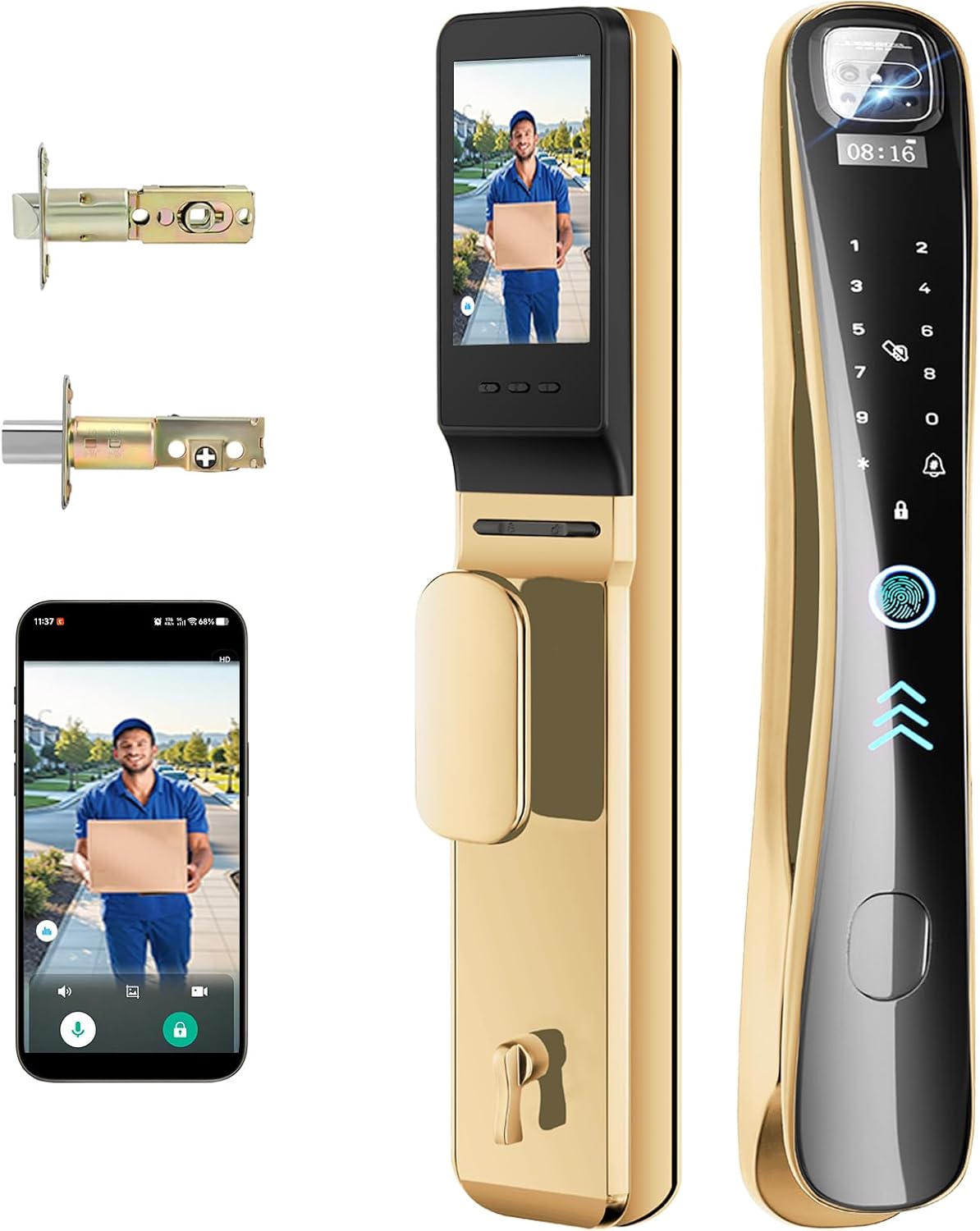
EIYSIE Video Smart Lock with Camera & Doorbell, 8-in-1 WiFi Keypad Deadbolt
An 8-in-1 WiFi keypad deadbolt that folds a camera and a doorbell into the lock body. The feature count is the pitch here, aimed at buyers who want one device covering entry and porch video.
Visit on Amazon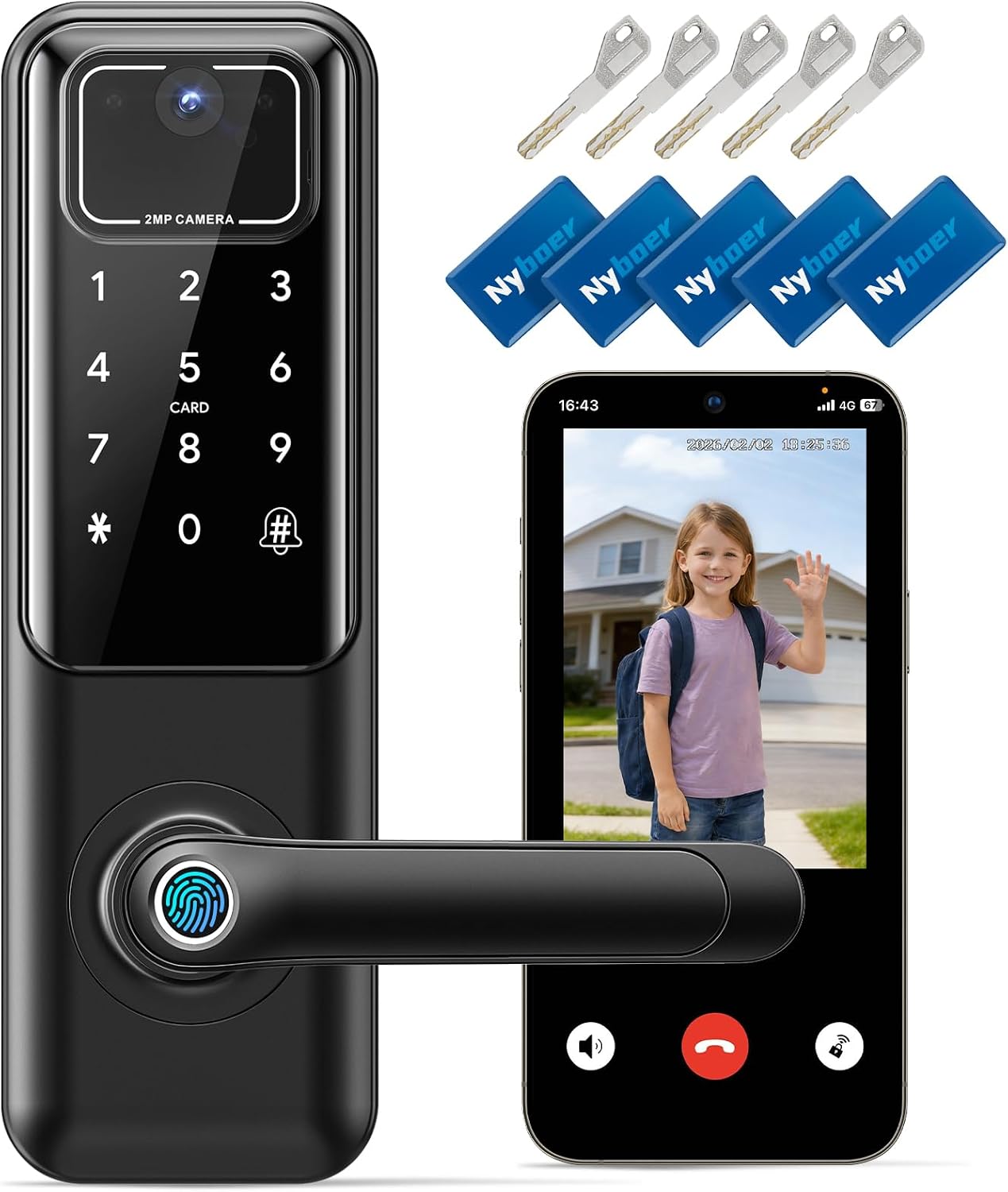
WiFi Video Smart Keypad Door Lock with Camera and Doorbell, Keyless Entry
A WiFi video smart keypad door lock with a camera and doorbell built in, positioned around keyless entry. A straightforward option for someone who wants camera video at the door without a long feature list.
Visit on AmazonPrices and availability may change. Check the retailer for current details.
How these products were compared
This guide compares access methods, camera and doorbell features, app and connectivity claims, included accessories, and hardware finish and trim. Product names, images, and retailer links are matched by product identifier so that every card points to the product shown.
One note on method: the details below come from the manufacturer-listed product information for each model, not from a bench test or a teardown. Where a listing does not state something, such as camera resolution on a specific model, this guide says so rather than guessing. Nothing here should be read as a measurement of battery life, video quality, or fingerprint accuracy on a specific unit. Readers should confirm the current price, availability, and return terms through the retailer link on the card they are considering.
How to choose the right video smart lock
Start with the question that actually splits this category: do you want a camera on the door, or do you want codes and nothing else? A keypad-only deadbolt like the Schlage Camelot is the honest answer for a lot of people. It has no WiFi radio to pair, no app to update, no subscription to think about, and nothing to reboot. The trade-off is that you give up porch video entirely, and you give up remote code management, so a landlord who wants to issue a temporary code from a phone is out of luck.
If you do want camera video, the next decision is how many ways you want to get in. The S398 model lists four: fingerprint, keypad, app, and remote control, plus an indoor display monitor so you can see the porch without pulling out a phone. The myQ Secure View adds face recognition on top of fingerprint and PIN access, and it ships with a chime and a second battery. The EIYSIE lock markets itself on an eight-in-one feature count, while the WiFi Video Smart Keypad Door Lock keeps the description shorter and centers on keyless entry with camera and doorbell video.
Then think about the door itself and the network behind it. Most of these locks and their gateways speak the 2.4GHz band only, and a router that broadcasts 5GHz-only will leave you staring at a lock that never connects, with no error message that explains why. If you already run a mesh system that splits bands, check that before you buy, not after. The same goes for setup order: pairing the lock to the app before adding a gateway saves a factory reset, and a factory reset wipes every code you have set.
Finally, price the whole job, not the lock. A chime that is not in the box, a second battery, and a subscription for basic remote access all change the real cost per door, especially if you are buying for more than one unit. If you are outfitting several doors at once, read our guide to matching locks across a rental property before you commit to a brand.
S398 Video Smart Lock, 4-in-1 Fingerprint Door Lock with Camera & Video Doorbell, Wi-Fi Deadbolt, Indoor Display Monitor, App Remote Control, Easy Installation, Chime Included-2026 Upgrade
This is the pick that covers the most ground without forcing you into a flagship price bracket. The listing describes a 4-in-1 fingerprint door lock that also carries a camera and video doorbell, a Wi-Fi deadbolt, an indoor display monitor, app remote control, and an included chime. That combination matters for two specific buyers. For a short-term rental host, the fingerprint reader handles repeat guests and the code handles one-time visitors, while the camera covers the porch. For a household with a mix of tech comfort levels, the indoor display means someone can see who is outside without learning an app.
The trade-off is transparency. The listing leans on the feature count and the 2026 upgrade language rather than publishing a camera resolution or a night vision specification, so if 2K HDR video or color night vision is the thing you care about most, the myQ Secure View states those details directly and is the safer choice on that single point. If you want a documented camera spec, this is not the model that gives it to you.
Alternatives to consider
The myQ Secure View™ 3-in-1 Smart Lock Deadbolt + myQ Chime + Extra Battery is better suited to a buyer who wants the camera specification spelled out, with a 2K HDR doorbell camera, face, fingerprint, and PIN access, color night vision, and two-way audio, and who values the included chime and spare battery. The Schlage Electronic Keypad Deadbolt Lock, Camelot Trim, Aged Bronze is a stronger fit when you want a keypad deadbolt in a traditional Camelot trim and aged bronze finish, with no camera and no app layer at all.
The EIYSIE Video Smart Lock with Camera & Doorbell, 8-in-1 WiFi Keypad Deadbolt and the WiFi Video Smart Keypad Door Lock with Camera and Doorbell, Keyless Entry cover the all-in-one end of the range for buyers who want camera video built into the lock body rather than mounted beside it. The EIYSIE is the one to look at if a long feature list is what you are shopping for, and the WiFi Video Smart Keypad Door Lock is the simpler pitch for keyless entry with a camera and doorbell.
Day-to-day use and maintenance
Every lock in this group runs on batteries, and the honest maintenance advice is the same for all of them: replace cells on a schedule instead of waiting for a low-battery warning, because the warning always arrives at the worst possible moment, usually with a guest on the porch. Keep a spare set on hand, and if a model ships with a second battery, use it as a rotation rather than letting it sit in a drawer.
Check the deadbolt throw after installation and again after the first cold snap. A bolt that does not fully extend into the strike plate looks locked and is not, and a door that swelled or shifted with the season can turn a good install into a bad one. Adjust the strike plate rather than forcing the bolt.
Clean the camera lens and the fingerprint reader with a dry, soft cloth. Worn fingers, wet hands, and gloves all change how a fingerprint reader behaves, and a keypad code is the backup that keeps you out of trouble when the reader is not cooperating. If the model supports a privacy or anti-peeping code, use it, especially on a street-facing door where someone can watch you type.
On the software side, keep the app updated, remove codes for guests who have checked out, and know where the factory reset procedure is documented before you need it. A reset clears every code on the lock, so it is a last resort, not a first step.
Buying checklist
- Measure your door thickness and backset, and confirm the existing deadbolt bore before ordering.
- Decide whether you want a camera on the door at all, or a keypad-only deadbolt.
- Choose the access method you will actually use daily, fingerprint, keypad code, PIN, or face, rather than the longest feature list.
- Confirm the exact model includes the chime, battery, or display monitor you are counting on.
- Check that your router broadcasts a 2.4GHz network for the lock or gateway.
- Read the manual's setup order before you start pairing, and note the factory reset steps.
- Verify the current retailer price, availability, and return terms.
Final recommendation
Choose the S398 Video Smart Lock, 4-in-1 Fingerprint Door Lock with Camera & Video Doorbell when you want one unit to handle fingerprint entry, keypad codes, porch camera video, an indoor display, and an included chime on a single front door. Choose the Schlage Electronic Keypad Deadbolt Lock, Camelot Trim, Aged Bronze when you want a keypad deadbolt only, with no camera, no app, and no pairing step. If a documented 2K HDR camera with face recognition and color night vision is the priority, the myQ Secure View™ 3-in-1 Smart Lock Deadbolt is the model whose listing states those details, and it arrives with a chime and a spare battery.