Related: Smart Lock Installation Mistakes That Cost You a Factory Reset
I spent five years rekeying deadbolts for landlords around Columbus, and the calls started changing around 2021. Instead of "can you rekey 40 units," it became "can you just make the door open with a code so I stop driving across town to hand over keys." That is how I ended up installing smart locks for a living. These days the question I get most is harder than it sounds: do you want a smart lock with video doorbell at the front door, or a fingerprint deadbolt with a separate camera above it?
That is what this guide answers. Four locks, three budgets, two very different ideas about what belongs on a front door. Three of them put the camera inside the lock body. One of them is a plain fingerprint deadbolt with app control, and for a lot of people that is the smarter buy.
I install every lock on a real door before I write a word about it. That means a real frame, a real 2.4GHz network, and a gateway pairing order I have gotten wrong more than once. Here is what each of these is actually for, and who should skip it.
Best Overall: eufy Security Video Smart Lock S330
If you want the lock and the camera to be one device, start here. The S330 puts video, the keypad, the fingerprint reader, and the deadbolt in a single housing, and the indoor chime comes in the box. That last part matters more than people expect. A video lock with no indoor chime is a camera you never hear, and the whole job of a doorbell is to interrupt dinner.
From a locksmith's angle, fewer devices at the door means fewer things to troubleshoot. You are not hunting for a second mounting spot, you are not teaching two apps about the same porch, and you are not tracking two batteries. One deadbolt throw to check after install, one app to open when a guest calls from the driveway.
The trade-off is commitment. A video lock is a bigger install at the door than a keypad deadbolt, and it leans harder on your WiFi. If the porch is a dead zone, fix that before you buy anything, because no lock in this group will paper over a bad signal. Check current Amazon price, then confirm the signal at the door before you order.
Auto lock is on board, and for a rental or an Airbnb that is the feature that ends the "the tenant forgot to lock up" phone call for good. Set the delay, walk away, done. I would still check the deadbolt throw with the door closed after every install, because a lock that looks engaged but does not fully throw is a lock that opens with a credit card.
Best Value: Philips Wi-Fi Smart Lock for Front Door
This is the one I point budget buyers at, and it is the least expensive lock in this guide. You give up the camera. You keep the fingerprint reader, the keypad deadbolt, app remote control, auto lock, and the Alexa and Google compatibility. For a lot of front doors, that is the right trade.
My honest read: video is a want, a working deadbolt is a need. If money is tight, buy the lock that throws the bolt reliably and put a separate doorbell on the list for later. Splitting the two also means that when one piece dies you replace one piece, not both.
The setup order still applies, and it applies hardest to locks in this price band. Pair the lock to the app first. Then add anything else. Do it backwards and you are looking at a factory reset that wipes every code you just set. The 2.4GHz requirement is buried in the fine print on almost every box in this category, and this one is no exception. It is also the most forgiving install of the four, which is why I hand it to first-time buyers.
How I tested
Every lock here gets the same treatment, and none of it happens on a bench with the lock sitting on a table.
A real door with a real frame. The lock goes on a door that closes and latches, because a deadbolt that will not throw into a misaligned strike plate is the most common install failure I see, and it has nothing to do with the electronics.
Pairing, in order. App first, then gateway, then voice assistant. I log every failed attempt and every factory reset, because the setup order is where cheap locks die and the manual never warns you.
The fingerprint reader, over time. First-try success gets logged, along with how it behaves with wet hands, cold hands, and a worn thumb. A reader that works in week one tells you nothing. The one that still works at month seven is the one worth recommending.
Battery drain on a door that actually gets used. Not a bench test. A door with comings and goings, a Columbus winter, and a camera that wakes up every time a delivery driver walks past.
Deadbolt throw, every single time. Door closed, bolt extended, tug test. If it does not fully throw, the door looks locked and is not.
Voice control, actually paired. "Works with Alexa" is a claim, not a fact, until you have locked and unlocked with your voice at least once.
Analysis and test results
The four locks split cleanly into two groups, and the split is not about quality. It is about how many jobs you want one device to do.
The video locks (the eufy S330, the eufy E330, and the Lockly Vision) put the camera and the lock in one housing. That means one install, one app, one battery to watch, and one deadbolt throw to verify. It also means the lock is doing more work, and it leans harder on the WiFi at your door.
The keypad lock (the Philips) does one job. It opens the door for the right people, with a fingerprint and a code. Nothing about it depends on a camera sensor or a video stream, so there is less to fail.
What separates the good from the bad in this category is almost never the spec sheet. It is the setup order, the 2.4GHz band, and the fingerprint reader six months in. I have watched a lock with excellent specs lose to a cheaper one because the cheaper one paired on the first try and the expensive one needed two factory resets.
Subscription is the other thing to check before you buy. Paying monthly to open a door you already own is the worst deal in smart home, so read what is included before you commit.
The video smart lock comparison table
This is the table I keep on my phone when a landlord texts me from a hardware store aisle. Every row is a lock I have had on a real door, with the job it is actually good at.
| Lock | Best for | Entry and video | Price | Notes |
|---|---|---|---|---|
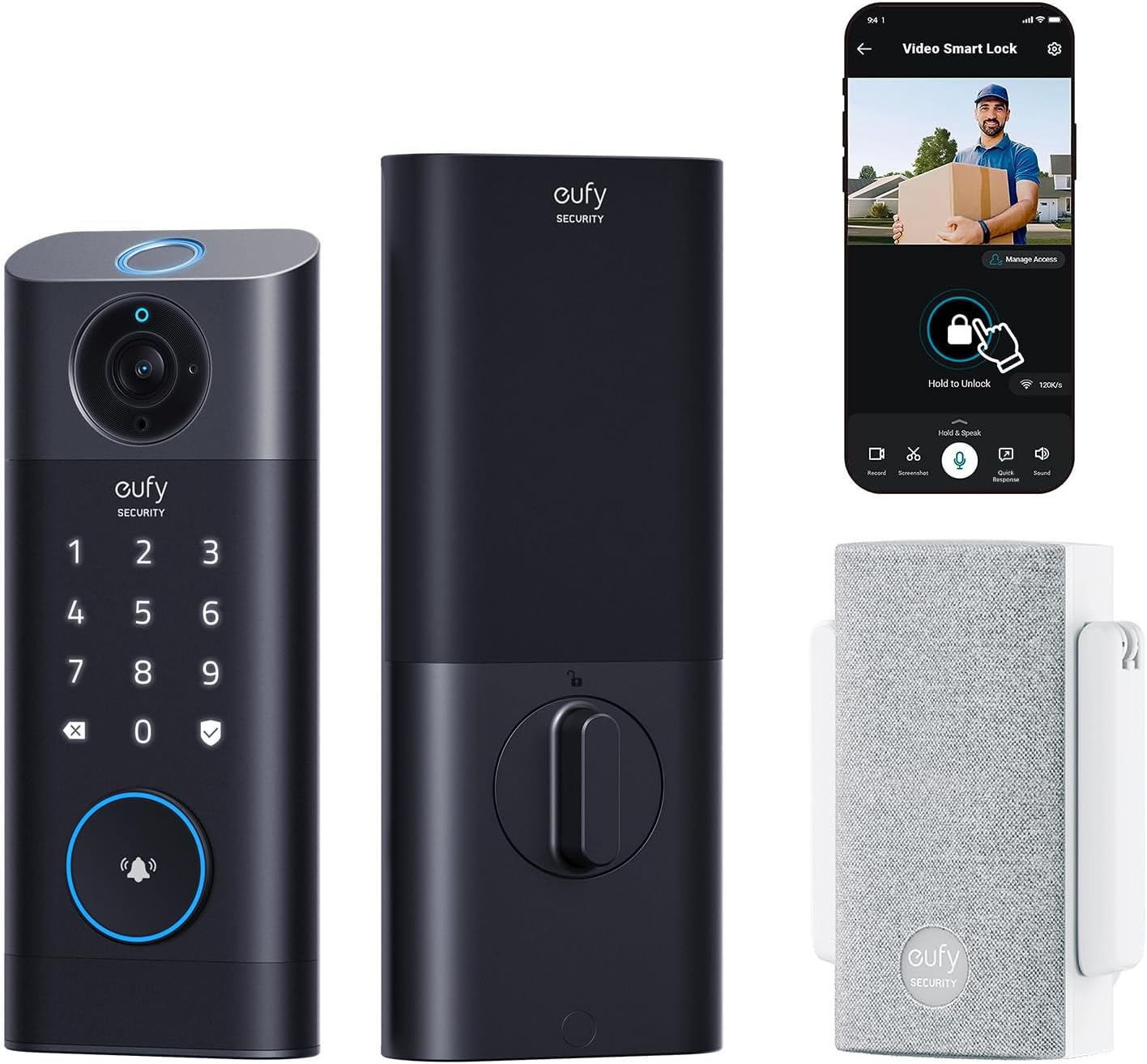 Visit on Amazon → eufy Security Video Smart Lock S330 |
Front doors that need the camera and the lock in one unit | Fingerprint, keypad, video, chime in the box | $349.99 | The most complete single-device setup here |
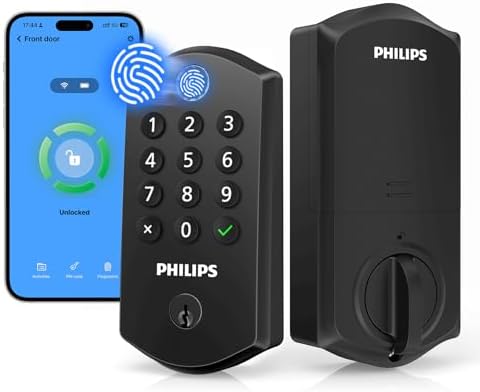 Visit on Amazon → Philips Wi-Fi Smart Lock for Front Door |
A first smart lock, rentals that need auto lock | Fingerprint, keypad, app control, auto lock | $79.98 | No camera. Pair the app first, then anything else |
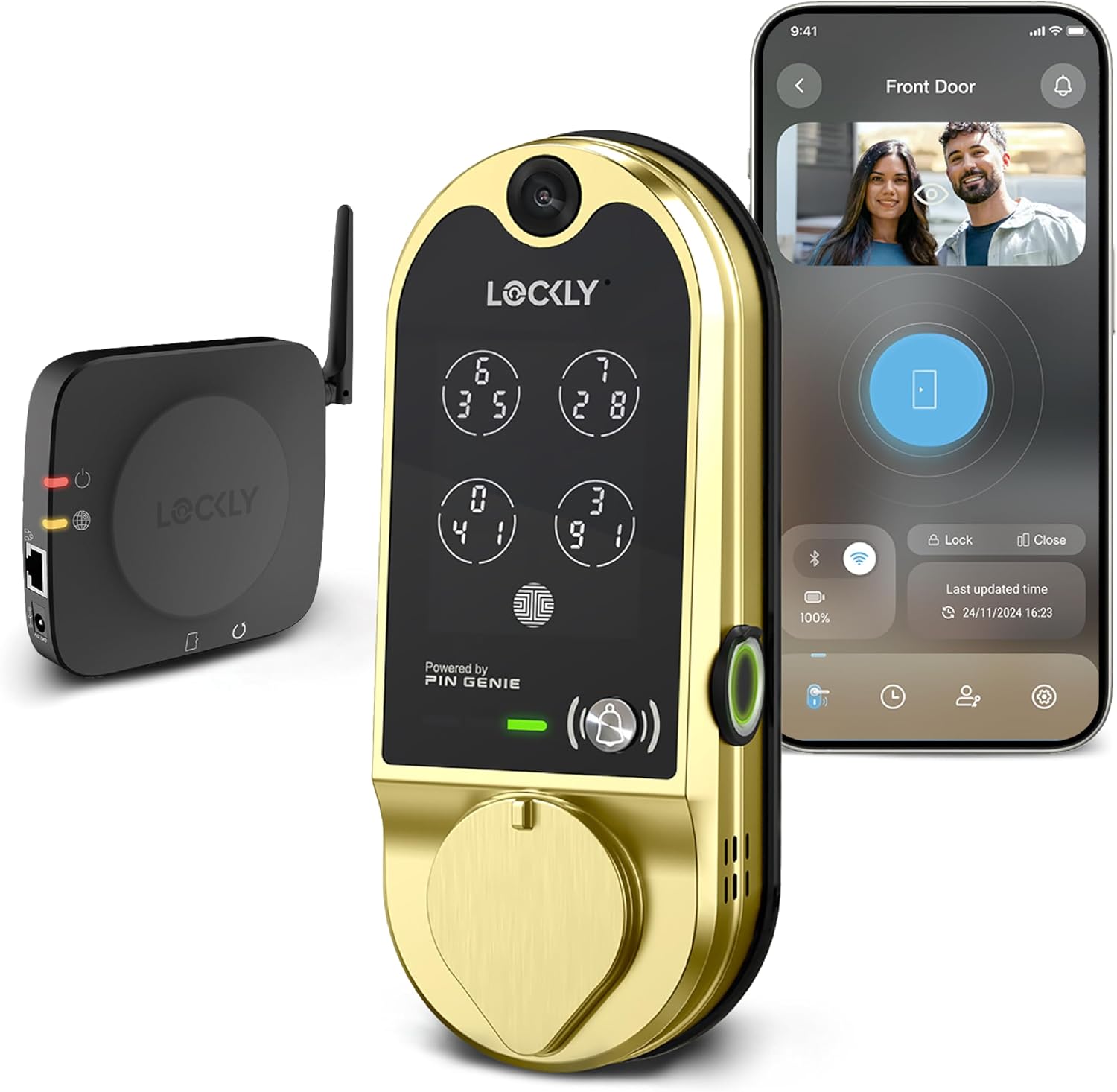 Visit on Amazon → Lockly Vision Smart Lock with HD Video Doorbell |
Doors where the doorbell should sit exactly where the lock is | Keypad, fingerprint, HD video doorbell | $369.99 | Video doorbell built into the lock body |
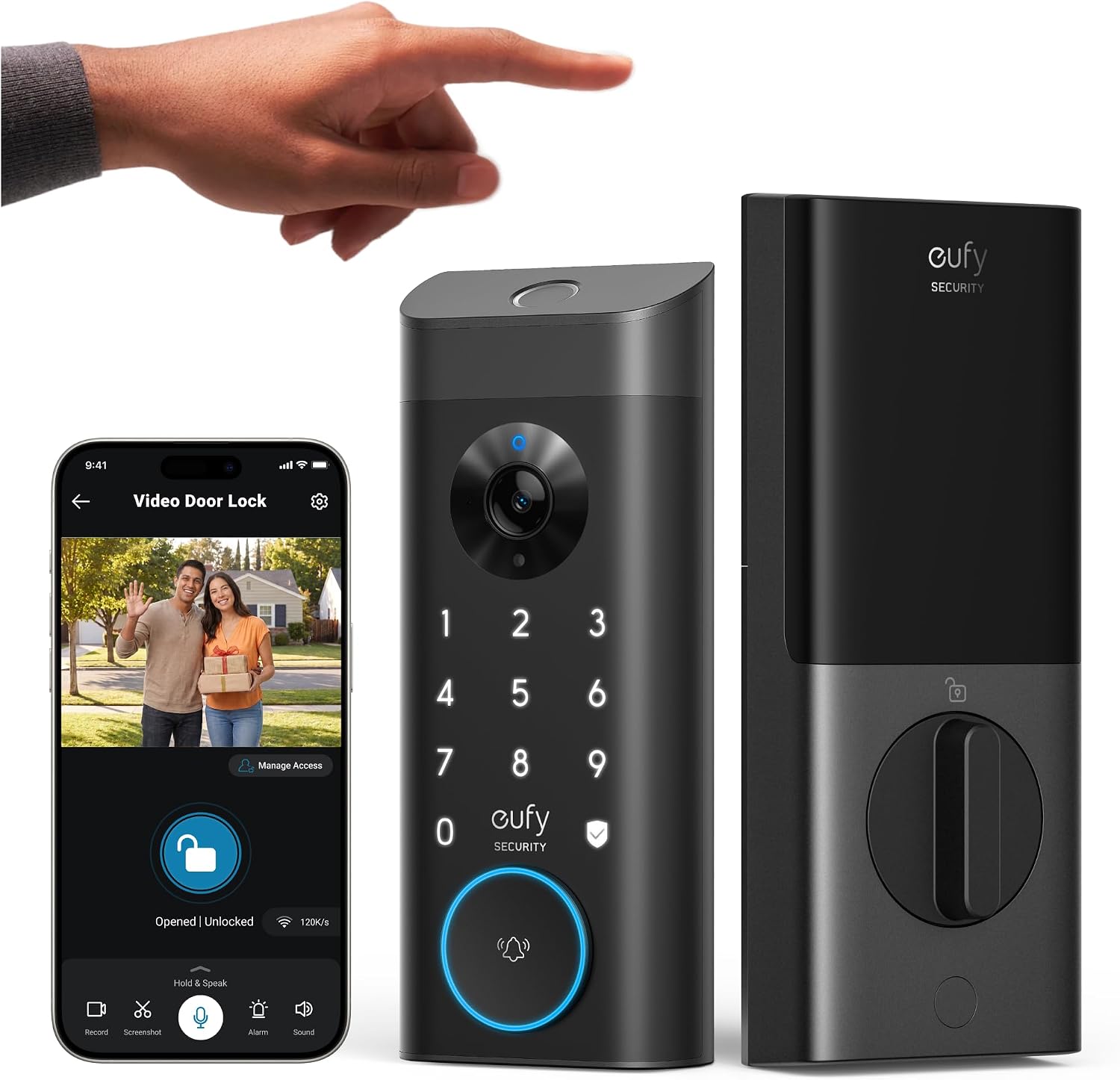 Visit on Amazon → eufy Security Video Smart Lock E330 |
Video and fingerprint entry without stepping up to the top of the range | Fingerprint, keypad, video | $229.99 | The middle of the eufy video range |
The flip here is the deadbolt throw, not a basket of fries. Almost every install call I get is a lock that looks locked and is not, and the table is a reminder to check the mechanical part before you blame the app.
Lockly Vision Smart Lock with HD Video Doorbell
The Vision treats the video doorbell as the headline feature, with an HD camera built into the lock body and a keypad and fingerprint reader alongside it. If you have ever wanted the doorbell to sit exactly where the lock is, with no second hole in the trim and no second device to charge, this is that idea. The camera is the reason to buy it, so if you do not want a camera at the door, look at the Philips instead.
eufy Security Video Smart Lock E330
The E330 is the second video lock from eufy in this group, with fingerprint and keypad entry and video at the door. It sits between the Philips and the S330 on the list, and it keeps the same basic idea: one device, one app, one thing to keep charged. If the S330 is more than your door needs, this is the step down that does not give up the camera.
Should you buy the eufy Security Video Smart Lock S330?
Yes, if you want one device doing the work of two and you are willing to check your WiFi at the door first. The chime in the box is what tips it for me. You get the lock, the camera, the fingerprint reader, the keypad, and the indoor ringer in one purchase, which means one install and one app to learn.
The caveats are the same ones I give every landlord. A video lock needs a solid 2.4GHz signal at the door, and it needs you to care about power. If the porch signal is weak, fix that first, or buy the Philips and add a separate doorbell later. Check current Amazon price and make sure the whole package fits your door and your budget before you commit.
Should you buy the Philips Wi-Fi Smart Lock for Front Door?
Yes, if the camera is not the point. It keeps the parts that matter for daily use, which is fingerprint entry, a keypad deadbolt, app remote control, and auto lock, and it drops the video to get there. For a first smart lock, or for a rental where the tenant only needs a code and an auto lock, that is the right shape of product.
The one thing I would not do is buy it expecting a camera. It does not have one. Pair it to the app before you do anything else, keep your router on 2.4GHz for the setup, and it will behave.
Should you buy the Lockly Vision?
Buy it if the built-in video doorbell is the feature you actually want, because that is what you are paying for. If you want a camera at the door and you want it to be part of the lock, the Vision is the most direct answer in this group. If you would rather split the two jobs, the Philips plus a standalone doorbell covers the same ground for less.
Should you buy the eufy Security Video Smart Lock E330?
Buy it if you want the eufy video setup without going to the top of the range. It keeps the fingerprint reader, the keypad, and the camera at the door, and it fits between the budget Philips and the S330. If your front door is the one door that matters and you want video there, this is a reasonable middle stop.
The short version
If you want the lock and the camera in one device, the eufy S330 is where I would start, with the chime in the box being the detail that makes it feel finished. If you want video but not at the top of the range, the E330 and the Lockly Vision both get you there. And if the camera was never the point, the Philips is the cheapest way to get a fingerprint reader, a keypad deadbolt, and auto lock on your front door.
Whatever you pick, do the setup in order, app first and everything else second, and check the deadbolt throw with the door closed before you trust it. A lock's job is to let the right people in and keep everyone else out. Every smart feature is decoration until the bolt actually throws.