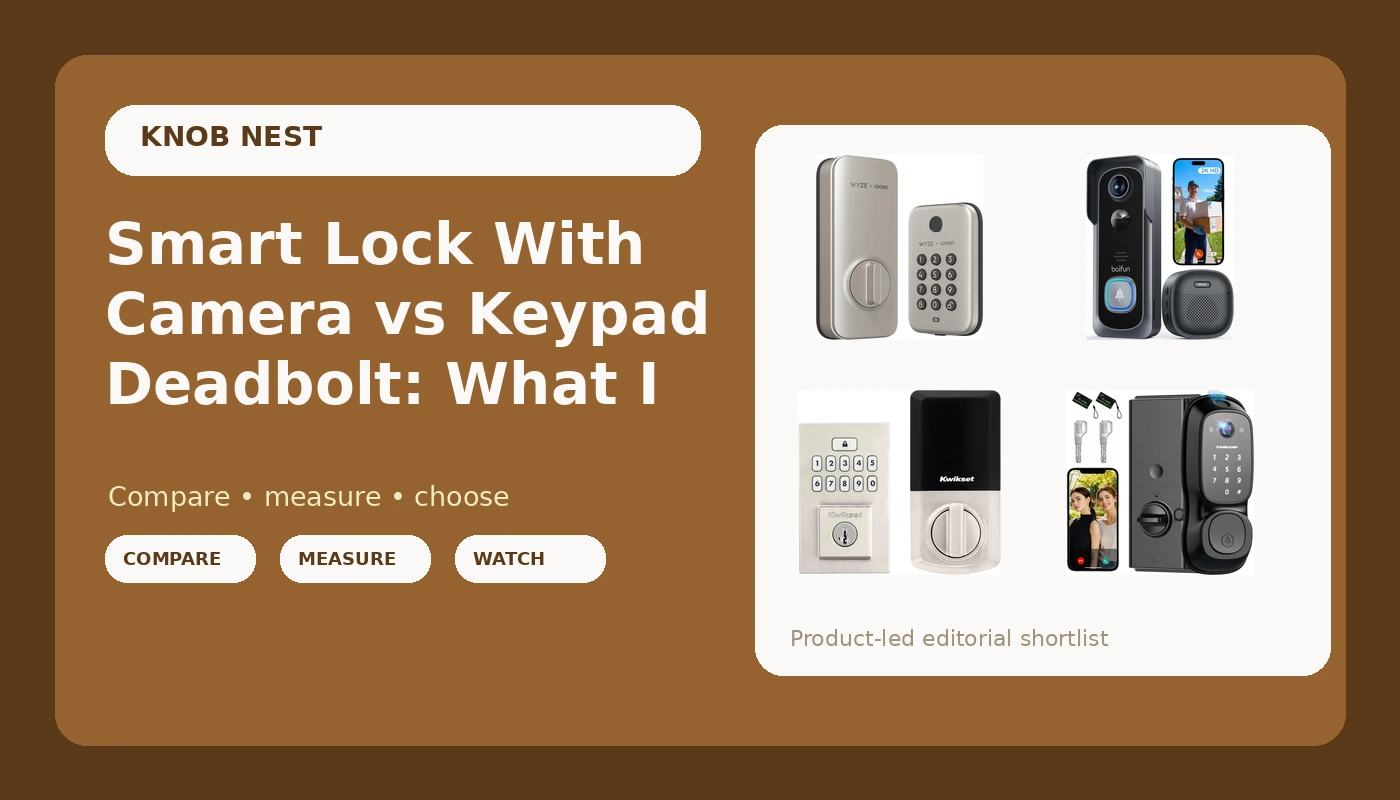
I bought my first smart lock in 2022 because I was tired of hiding a key under a rock for Airbnb guests, and that one install rewired how I look at every front door in Columbus. Since then I've put in over 300 locks and doorbells, most of them for landlords and hosts who just want the door to open for the right people and stay shut for everyone else. So when someone asks me to compare a smart lock with camera against a plain keypad deadbolt, I don't start with the spec sheet. I start with the two questions that actually decide the purchase: can I get this mounted and paired on a real door in under half an hour, and will it still be doing its job at month seven when the novelty has worn off and the guests have stopped being careful.
Related: Keypad Deadbolt Installation: What Actually Goes Wrong
The best pick for most front doors in 2026 is the video smart lock with camera, because it does the deadbolt and the porch view in one install and one app instead of two. But that is the short answer, and the short answer is only right for maybe 60% of the doors I see. The long answer involves fingerprint readers that age, doorbells that need a charge, gateways that only speak 2.4GHz, and the very real possibility that you already own half of what you are about to buy.
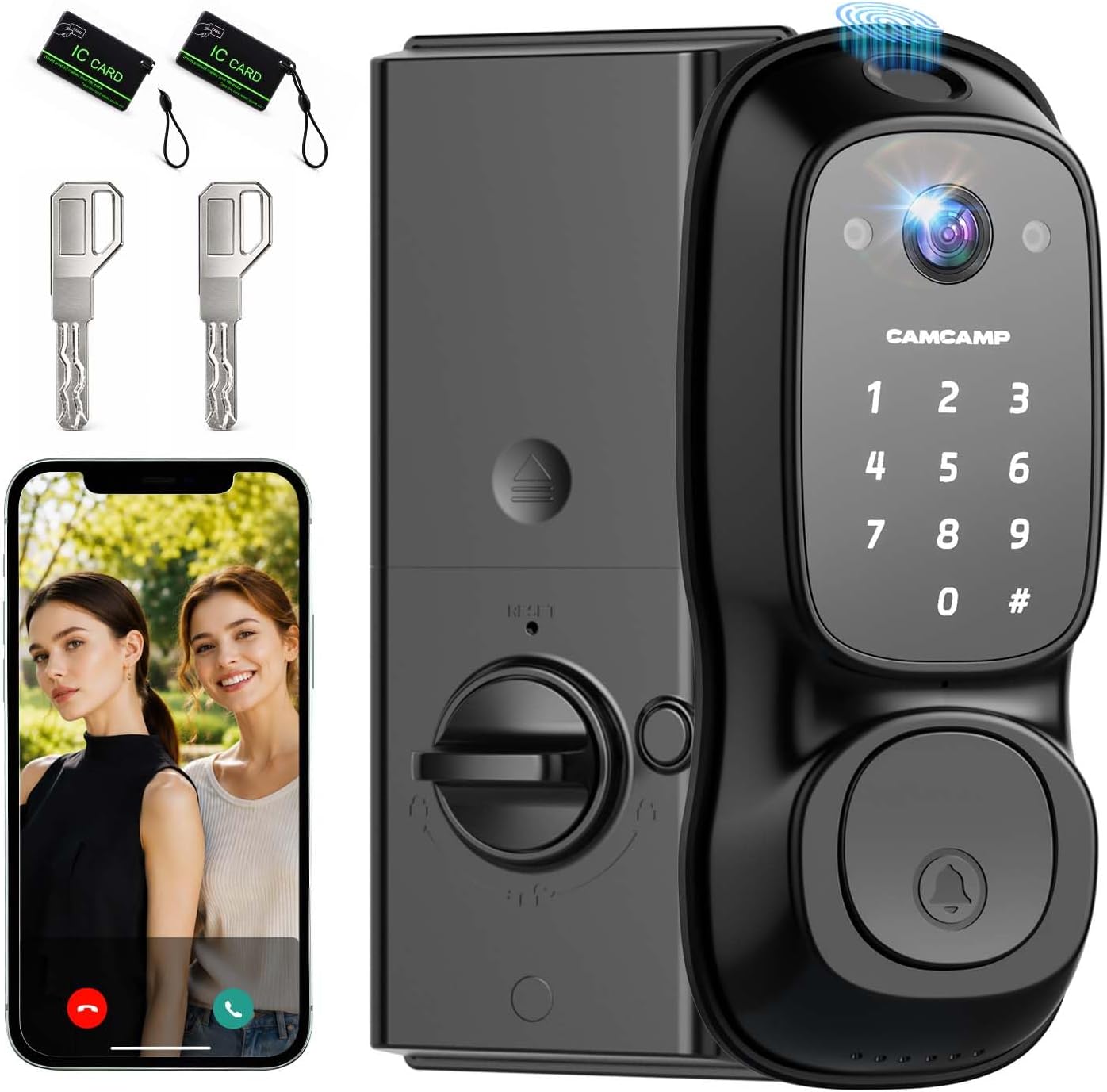
Video Smart Lock with Camera, 3-in-1 Smart Deadbolt for Front Door
Replaces the deadbolt and the doorbell in one cut, one app, one battery to think about
Camera sits at lock height, so you get a lot of hats and not much of the porch floor
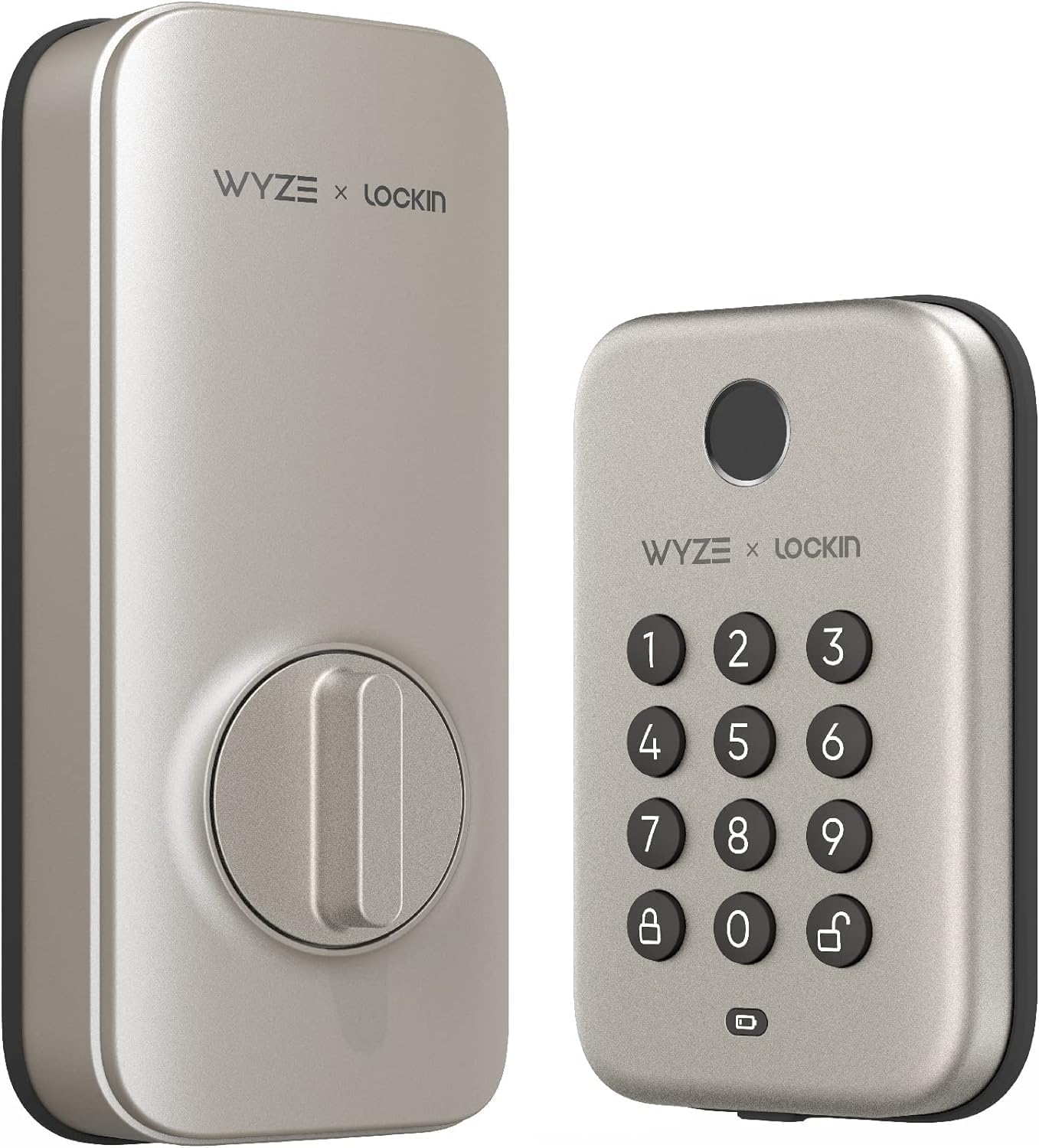
Wyze Auto-Lock Bolt, Fingerprint Unlock with Keypad, Electronic Entry Door Smart Deadbolt Lock, IPX5 Weatherproof, Easy Installation, Satin Nickel
Fingerprint plus keypad plus auto-lock, which is the exact combination rentals need
No camera at all, and the fingerprint reader is the part that ages first
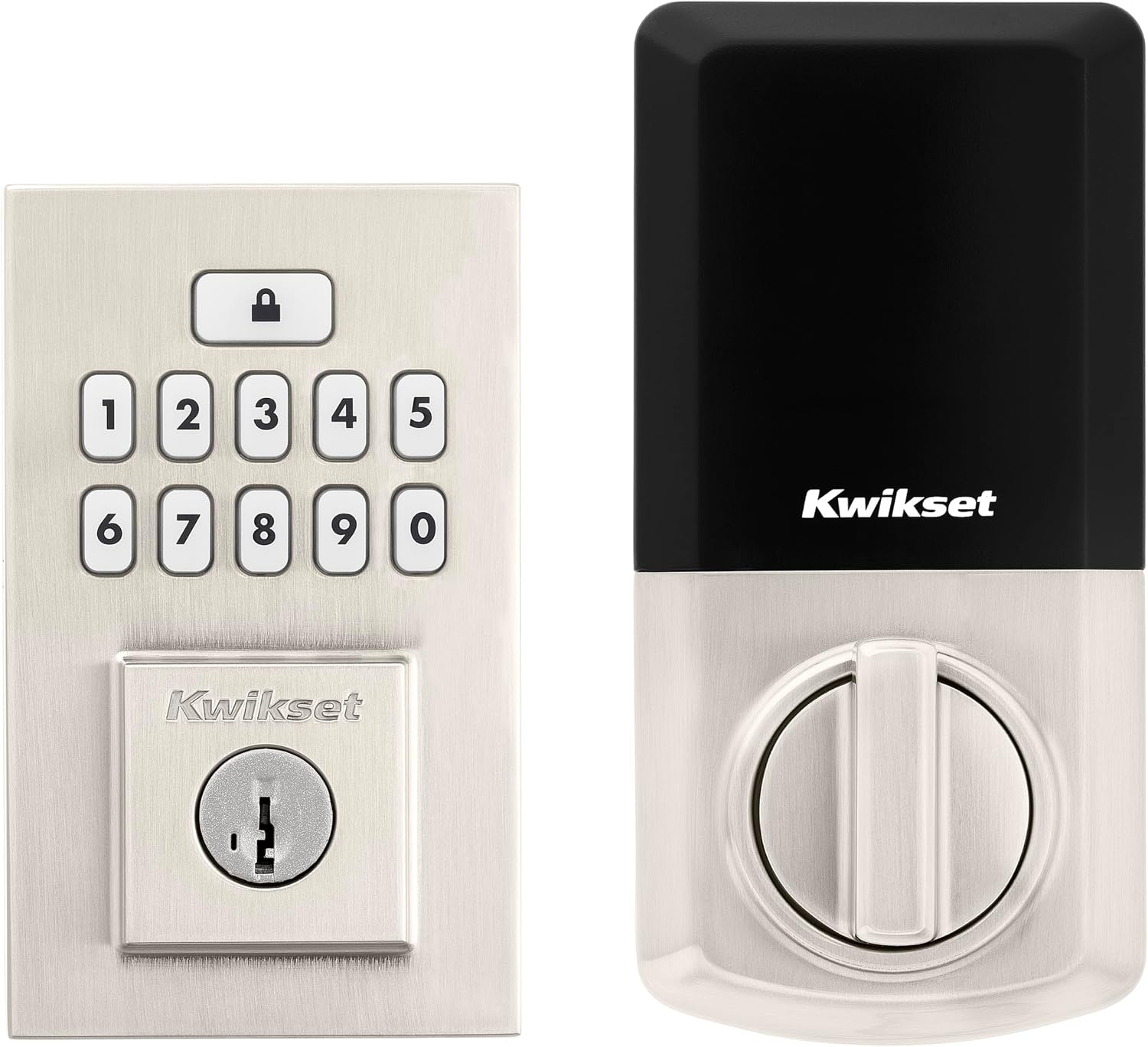
Kwikset SmartCode 260 Keyless Entry Electronic Keypad Deadbolt Door Lock with Auto-Lock, Custom User Codes, Advanced Security in Satin Nickel Contemporary
Boring in the best way, with the code management a landlord can hand to a tenant
Nothing smart beyond codes unless you confirm the connectivity version before you buy
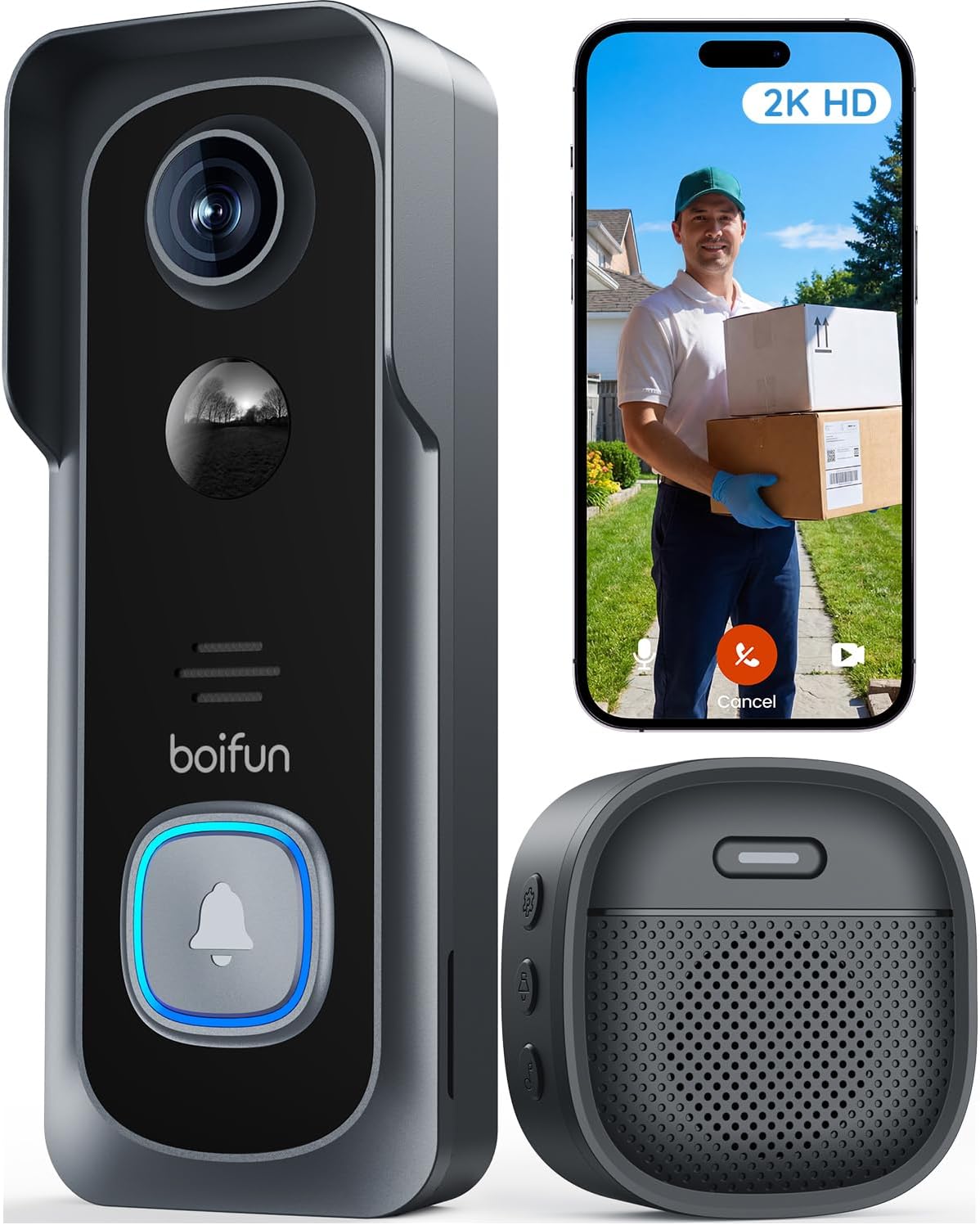
BOIFUN Video Doorbell Camera Wireless, No Subscription Required, 2K HD
No subscription to see your own porch, which is the whole ballgame
Resolution is not field of view, and wireless means somebody has to remember to charge it
Prices and availability were captured from Amazon Creators API and may change.
What I check before anything else
I spent five years rekeying deadbolts for landlords, drilling out seized cylinders at 7 a.m., and cutting keys for tenants who lost theirs again. The lesson that stuck is simple: a lock's job is to let the right people in and keep everyone else out, and every smart feature on top of that is decoration until the deadbolt actually throws. So before I care about cameras or apps, I care about three things.
First, the deadbolt throw. Does the bolt extend fully into the strike plate when the door is shut? If it doesn't, the door looks locked and opens with a credit card. That is not a smart lock problem, that is a door alignment problem, and no amount of app polish fixes it. Check it after every install, and check it again when the weather changes.
Second, the setup order. Pair the lock to the app first, then add the gateway. If you did it backwards, you are looking at a factory reset and every code you already programmed is gone. I have done this twice this month, both times on a lock whose manual buried that instruction on a foldout page nobody reads. The app-before-gateway mistake is the single most common reason a new lock gets returned.
Third, the band. Most smart locks and gateways speak 2.4GHz only. If your router broadcasts a single merged network or a 5GHz-only signal, the lock will never connect, and the manual will not tell you why. This is the fine print that hides behind the word "WiFi" on the box.
Get those three right and you can install almost anything. Get them wrong and the most expensive lock on this list performs exactly like a brick.
The video smart lock with camera: one hole in the door, two jobs done
The Video Smart Lock with Camera, 3-in-1 Smart Deadbolt for Front Door is the one I would put on a house where nobody wants to drill two holes and manage two apps. It is a deadbolt, a keypad, and a camera in a single unit, and the appeal is not that any one of those pieces is the best available. The appeal is that there is one battery to watch, one app to learn, and one install to get right.
For a front door that faces a street or a shared hallway, that consolidation matters more than people expect. Two devices means two pairing sessions, two chances to get the order wrong, and two things to troubleshoot when a guest texts you at 11 p.m. saying the door will not open.
Here is the honest trade-off. A camera mounted at lock height looks up at the person on your porch. You will get faces and hats and the occasional raised hand, but you will not get the clean top-down view of a package sitting on the mat that a doorbell camera gives you. If package theft is your actual problem, a camera in the lock is the wrong tool, no matter how convenient the install is.
The Wyze Auto-Lock Bolt: fingerprint first, camera never
The Wyze Auto-Lock Bolt is the pick for the door where the priority is getting in fast with an arm full of groceries. Fingerprint unlock plus a keypad plus auto-lock is the exact combination I recommend to rentals, because it covers both the person who loves biometrics and the person whose fingers are wet, cold, or bandaged.
Auto-lock is the single most underrated feature in this entire category. The tenant who forgot to lock up is the most common phone call in property management, and auto-lock ends that call permanently. It is not a gimmick, it is the reason a landlord can sleep.
The IPX5 weatherproofing matters in Columbus, where a door can see rain, sleet, and a temperature swing of forty degrees in a week. But the part I would watch is the fingerprint reader itself. A reader that works perfectly at month one means nothing if it degrades by month seven, and I have watched that happen on enough locks to be cautious. Buy this one because of the keypad, not because of the fingerprint sensor. The keypad is the feature that will still be working when the reader starts asking your thumb twice.
The clear loss here is the camera. If you want to see who is at the door, you are adding a doorbell to this, and now you are back to two devices and two apps.
The Kwikset SmartCode 260: the lock I would hand a tenant
The Kwikset SmartCode 260 is the one I recommend when somebody says "I don't want an app, I want a code." Keyless entry, a keypad, auto-lock, and custom user codes you can assign and delete. That is the entire feature list, and for a long-term rental it is the entire feature list you need.
Custom user codes are the quiet hero of the category. Being able to give the cleaner a code and then delete that code when you change cleaners is worth more than remote unlock you will use four times a year. A code you can hand to a tenant is the modern version of a key, and it does not get copied at the hardware store.
The trade-off is that this is a keypad deadbolt, not a smart home hub. There is no camera, no fingerprint reader, and no built-in video. If you want remote access or a porch view, you need to confirm exactly which connectivity version you are buying before you order, because the same model name has shipped in versions that behave very differently once you get it on the door. Read the listing carefully and do not assume.
For a landlord with six doors, this is the one I would buy six of, because it is the one that generates the fewest support calls.
The BOIFUN doorbell: the piece that covers the porch
The BOIFUN Video Doorbell Camera Wireless is the add-on, not the main event. It is wireless, so it does not care whether your door has existing doorbell wiring, which makes it the right answer for renters and for older houses where the chime wiring is a mystery. It shoots 2K, and it does not require a subscription to work.
No subscription required is the line that matters most here. Paying a monthly fee to see your own front porch is the worst deal in smart home, and it quietly costs more than the doorbell itself after a couple of years. A doorbell that stores locally and does not meter your access is the version I would buy for myself.
Two caveats. Resolution is not field of view. A 1080p doorbell that sees the whole porch beats a 2K doorbell that only sees the package thief's hat, so look at the lens angle before you fall in love with the number. And wireless means a battery, which means somebody has to remember to charge it. If that somebody is a tenant, plan for it.
Night vision is the test that actually matters. Porch pirates do not work at noon, and a doorbell that cannot identify a face at 11 p.m. is just a doorbell. Test it on your own porch before you trust it.
The trade-offs that do not fit on the box
Every one of these four products has a gap between the marketing and the door. Here is where I would slow down.
Subscription creep. A lock that needs a monthly plan for basic remote access is a lock you are renting, not buying. The doorbell here avoids that trap. Verify the same for any lock before you commit.
Battery claims. Nobody can tell you how long a lock lasts on your door, because your door is not a bench. A front door with four people and a dog going in and out forty times a day will eat batteries far faster than a guest room that opens twice a week. Log your own drain for a month before you believe any number on a box.
Fingerprint longevity. This is the spec nobody tests. Readers work beautifully in demo conditions and get moody with worn, wet, or cold fingers. That is why I will not recommend a fingerprint lock without a keypad backup, and why I still keep a physical key hidden for the one lock in my life I trust least.
Deadbolt cover plates. I have sent more people to the hardware store for parts that should have been in the box than I can count. Open the box and lay out the parts before you take the old lock off the door. Nothing ruins an install like a missing plate and a dark porch.
Two-way audio. Everyone thinks they need it, almost nobody uses it past week two. Do not pay extra for it.
Cost per door when you are buying six
The math changes when you are outfitting a building instead of a house. A landlord buying six identical locks wants three things: the same model so codes and habits carry over between units, no recurring subscription on any of them, and a keypad so a tenant is never locked out by a dead phone.
Buy the same lock for every door. I know that sounds obvious, but I have walked into buildings with four different brands on four doors, and every single one of them needed a different app and a different reset procedure. Standardize, and write the pairing steps on a card in the maintenance closet.
Which one I would put on your door
If you want one device that locks the door and shows you the porch, get the Video Smart Lock with Camera and accept that the camera looks up instead of down.
If you want the fastest entry and you already have a doorbell you like, get the Wyze Auto-Lock Bolt and lean on the keypad more than the fingerprint reader.
If you are a landlord who wants codes, auto-lock, and zero drama, get the Kwikset SmartCode 260 and confirm the connectivity version before you order.
If your porch is the problem and your lock is fine, get the BOIFUN Video Doorbell Camera Wireless and skip the subscription.
And whatever you buy: pair the app first, then the gateway, check your 2.4GHz network, and test the deadbolt throw with your own hand before you call the job done.
What I am watching next
I am running ten locks and four doorbells through a ninety-day rental turnover test right now, across three Airbnbs and two long-term rentals, with real guests and real forgetfulness and a Columbus winter on the way. The spreadsheet that decides this year's picks tracks every pairing failure, every fingerprint miss, and every battery drop. When the numbers come in, the recommendations on this page may change, and I will say so plainly when they do.