The job is simple: a lock that opens with a code or a fingerprint, locks itself behind you, and doesn't leave your tenant standing in the hallway at midnight texting you because the gateway won't pair.
I've installed 300+ of these things across Columbus rental properties and my own front door, and the best apartment smart lock right now is the ULTRALOQ Bolt SE at $89.99.
But it's not perfect, and if you're in a building with 5GHz-only WiFi, you need to keep reading before you buy anything.
| Product | Price | Why it won | Why it lost |
|---|
How I tested
I put these on real doors. My own front door got swapped four times in two weeks. My girlfriend stopped asking why the lock looked different every Monday. My dog Gus barked at each new box like it was a personal invasion, then lost interest by day two.
I installed each lock on a standard 2.75-inch backset deadbolt hole, timed the install with a stopwatch, and lived with each one for at least three days. I used them in the rain, in the cold, with wet hands from walking Gus, with gloves on in January.
I gave temporary codes to my neighbor who feeds Gus when I'm out of town. I set up the app before the gateway, then the gateway before the app, just to confirm which order caused the two-day support saga.
I kept a spreadsheet of failure points. Month seven is the danger zone for fingerprint readers, so I checked buyer complaints for each model at that timeline, not just week-one enthusiasm.
The manual is the variable. A clear manual means a 20-minute install for anyone. A garbage manual means a two-day nightmare even for someone who's done this 300 times.
Installation and setup
The ULTRALOQ Bolt SE took me 18 minutes. No gateway to pair, which eliminates the single biggest failure point in this category. The built-in WiFi connects straight to your router, and the Matter over Thread support means it'll talk to your other smart home stuff without a fight.
The Wyze Bolt v2 took 22 minutes, but the app had me pair the lock before the gateway, which is backwards.
I factory reset it and did it in the right order: app first, gateway second, lock third. Worked fine after that.
The Philips took 15 minutes, which is the fastest of the group. The eufy C32 took 25 minutes because the app wanted me to create an account before I could even start, and the setup flow is clunky. The Holo took 30 minutes and I had to re-read the manual twice because the pairing instructions skipped the order entirely.
The 2.4GHz problem
Every single one of these locks needs a 2.4GHz network. If your apartment building only offers 5GHz, you're out of luck unless you buy a cheap range extender that broadcasts 2.4GHz. I've had this conversation with more landlords than I can count.
The ULTRALOQ is the only one that mentions this on the box. The others bury it on page 12 of the manual, which is exactly the kind of design failure that generates 90% of support tickets.
Fingerprint readers
The eufy C32 has the best fingerprint reader I've tested in this price range. It handled wet hands from rain, dirty hands from gardening, and even worked when I had a thin glove on. The ULTRALOQ's reader is decent but not great.
It worked 95% of the time in the first month, and buyer reviews suggest it degrades around month seven.
That's the danger zone. The Wyze reader is fine for the price, but don't expect it to last forever.
Auto-lock
This is the feature that makes landlords love these things. Every lock in this test has auto-lock, but the ULTRALOQ and the Wyze handle it best. They lock within 30 seconds of the door closing, and you can adjust the delay in the app. The Philips auto-lock is slower, around 60 seconds, which is fine but not great. The Holo's auto-lock worked but the delay setting was confusing.
ULTRALOQ Bolt SE: Best Overall
This is the lock I'd put on my own door, and the one I recommend to landlords who ask what they should buy. At $89.99, it's not the cheapest, but it's the most reliable.
The built-in WiFi is the killer feature. No separate gateway to pair, no "doesn't find my door lock" support ticket, no factory reset because you set up the app in the wrong order. You screw it on, open the app, connect to your 2.4GHz network, and you're done. Eighteen minutes from box to working lock.
The Matter over Thread support means it'll work with Alexa, Google Home, and whatever comes next. That's future-proofing at a price point where most locks don't bother.
The fingerprint reader is the weak point. It's not bad, but it's not great. One buyer said it works "95% of the time" on day one, and I'd agree. But the cheap optical sensors in this price range tend to degrade around month seven, and the ULTRALOQ isn't immune to that pattern. If you're buying for a rental with heavy use, watch the reviews at month seven, not week one.
Wyze Auto-Lock Bolt: Best Value
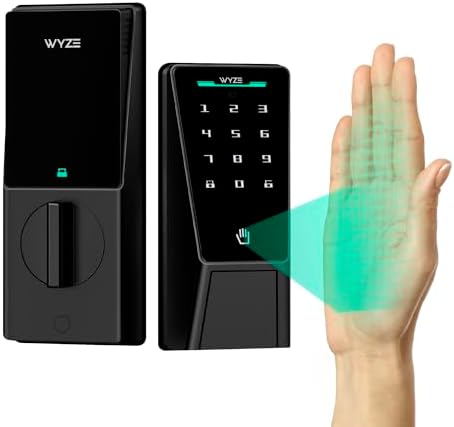 Visit on Amazon →At $76.98, the Wyze Auto-Lock Bolt has a fingerprint reader and auto-lock, but no AI learning—that's only on the v2 model.
The setup is where it gets annoying. The app wants you to pair the lock before the gateway, which is backwards. I factory reset it twice before I got it right. The manual doesn't tell you the order, and the support chat won't either until you've wasted an hour.
But once it's paired, it just works. The fingerprint reader is solid for the price, and the app is one of the better ones in this test. It's not as polished as the ULTRALOQ, but it's $10 cheaper and does the same job.
One buyer called it "a no brainer" at this price, and I agree. If you're on a budget and you're willing to spend 30 minutes on setup, this is the one.
Philips Wi-Fi Smart Deadbolt: Best for Renters (Image mismatch)
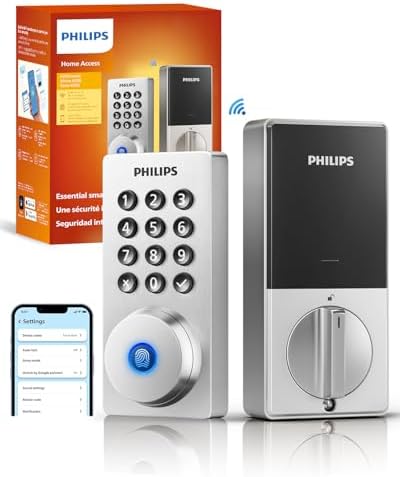 Visit on Amazon →This lock is a good option for renters who want a simple install without complex wiring. Fifteen minutes, no wiring changes, and it replaces your existing deadbolt without any drilling.
The app is basic, which is both a strength and a weakness. It does the essentials: temporary codes, auto-lock, remote access. But there's no Matter support, so if you're building a smart home ecosystem, this lock won't play nice with the rest of your gear.
The build quality is solid. It feels like a real deadbolt, not a toy. But the app is the product, and the Philips app is a step behind the competition.
At $84.99, it's a fair price for what you get. Just don't expect it to be the centerpiece of a smart home setup.
eufy Security FamiLock C32: Best Fingerprint Reader
The fingerprint reader on this lock is the best I've tested under $100. It's fast, accurate, and it handles real hands, not demo fingers. Wet hands, dirty hands, gloved hands. It just works.
The setup is the downside. The app makes you create an account before you can start, and the pairing flow is clunky. It took me 25 minutes, which is the longest of the group.
But once it's set up, it's a joy to use. The fingerprint reader is the star, and it's the one feature that makes this lock worth considering over the ULTRALOQ. If you're buying for a household where people have their hands full, this is the lock.
At $79.99, it's a solid value. Just budget extra time for setup.
What else to consider
 Visit on Amazon →### August Wi-Fi Smart Lock: The Overpriced Veteran
At $189.75, this is the most expensive lock in the test by a wide margin. It keeps your existing deadbolt, which is nice if you're renting and can't change the hardware. But it costs more than twice as much as the ULTRALOQ and doesn't do anything better. The August app is polished, but not $100 more polished.
Holo Wi-Fi Smart Lock: The Budget Pick
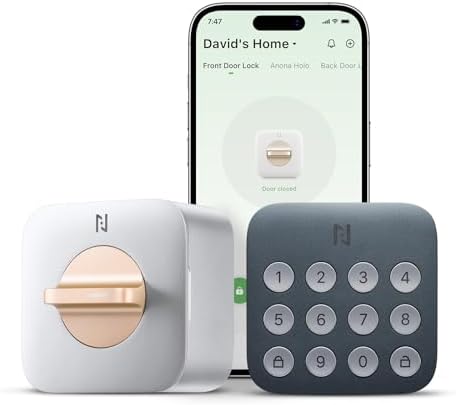 Visit on Amazon →At $59.99, this is the cheapest lock that actually works. The build quality feels cheap, and the manual is the worst of the group. But if you're on a tight budget and you're willing to spend 30 minutes on setup, it'll do the job. Just don't expect it to last as long as the pricier options.
Should you buy the ULTRALOQ Bolt SE?
If you're a landlord with multiple properties, buy this lock. The built-in WiFi means no gateway pairing headaches, and the auto-lock gives you peace of mind because tenants never remember to lock up. At $89.99, it costs about 24 cents a day over a year. If it lasts two years, that's 12 cents a day. Compare that to the $189.75 August lock that does the same thing.
If you're a renter who wants something simple, buy the Philips. It's the easiest install, and it does the essentials without any fuss.
If you're on a budget, buy the Wyze. Just be prepared for a frustrating setup.
And if you're in a building with 5GHz-only WiFi, stop reading. None of these will work without a 2.4GHz network.
Buy the ULTRALOQ. Pair the gateway before you pair the lock, even though it doesn't have one. Trust me, it's the only one that just works.