Keyless entry smart locks solve a problem I used to get paid to solve with a key machine and a stack of blank KW1s. A landlord with six units doesn't want six sets of keys floating around, and an Airbnb host doesn't want to drive across town at 11 p.m. because a guest shut the door on the only fob. I spent five years as a working locksmith before smart locks took over half my calls, and since then I've put in more than 300 of them, most of them on rental properties around Columbus.
Here's what I tell everyone before they spend a dime: a lock's job is to let the right people in and keep everyone else out. Every app screen and fingerprint sensor is decoration until the deadbolt actually throws. So this comparison is built around installation, pairing, and what happens at month seven, not around a spec sheet that lists features nobody uses past week two.
If you want the short answer: the Wyze Auto-Lock Bolt v2 is the one I would put on my own front door, and the ULTRALOQ U-Bolt Pro WiFi is the one I would hand to a landlord who wants to check six doors from a phone. The Philips model is the pick when the door needs a handle, and the ANYBELL is for the person who wants a camera and a lock in one box.
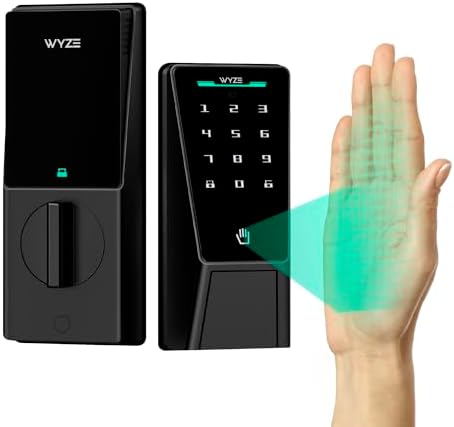
Wyze Auto-Lock Bolt v2
Auto-lock, fingerprint entry, and an anti-peep keypad at the budget end of this group
No camera and no door sensor, so it can't tell you the door was left open
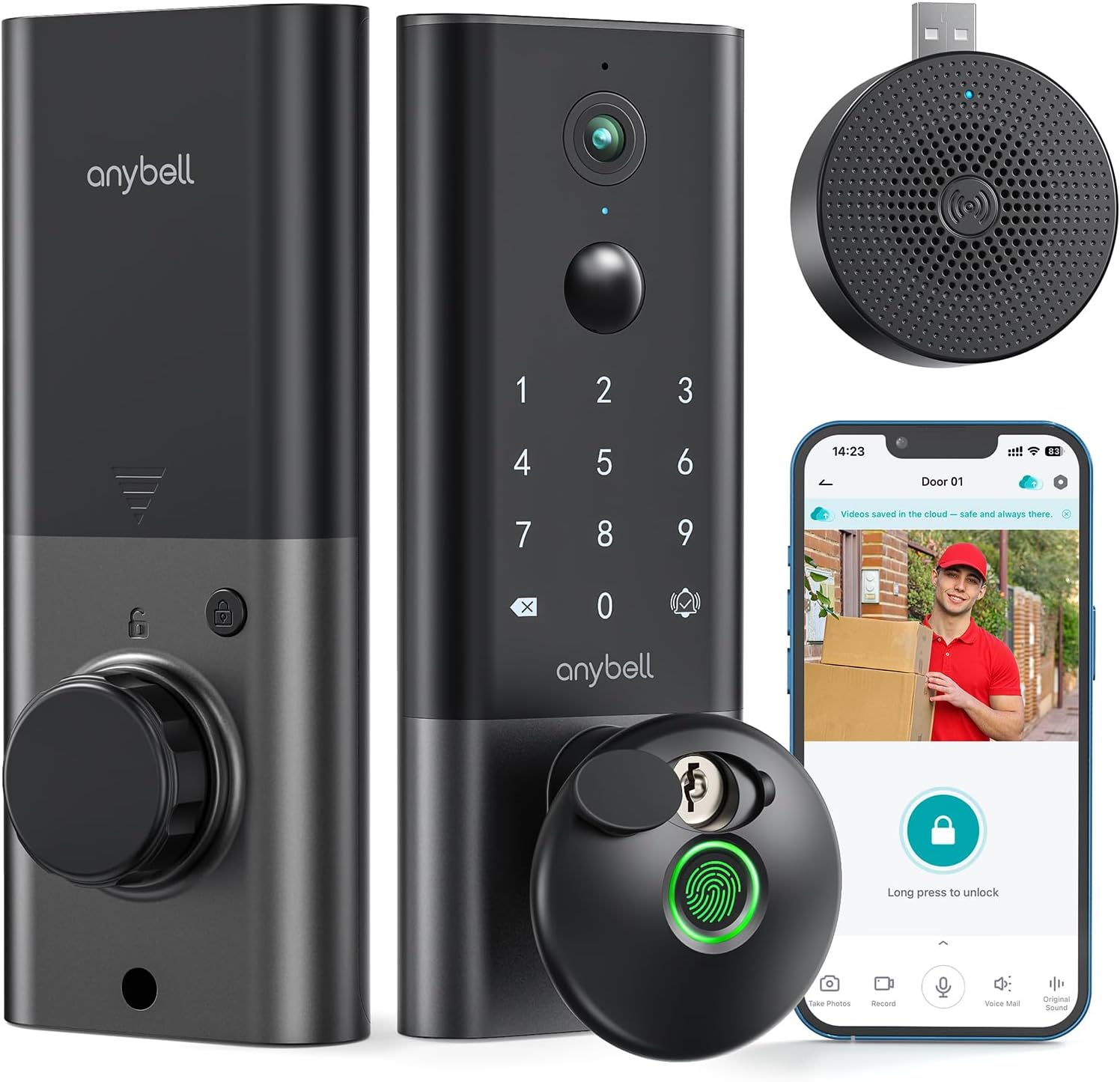
ANYBELL Fingerprint Smart Door Lock with Camera
Built-in WiFi, night vision, and two-way audio in a single deadbolt
Camera on a lock means one more thing to fail, and one more app to babysit
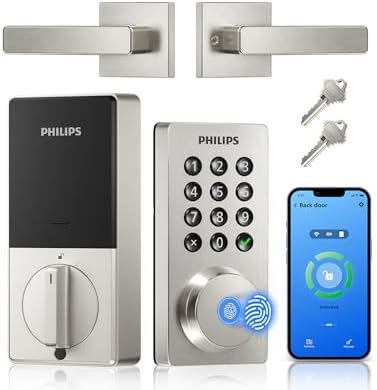
Philips WiFi Keypad Door Lock with Handle
Handle and deadbolt in one unit, voice unlock, satin nickel finish that hides fingerprints
The handle is the part that breaks first on any lever, and this is the one install here that changes the whole door
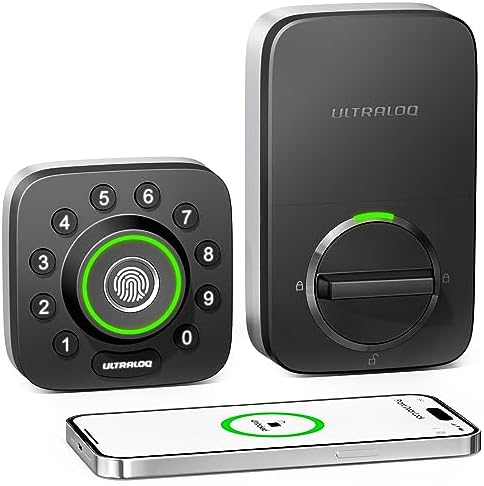
ULTRALOQ U-Bolt Pro WiFi Smart Lock
Door sensor plus app remote control, which is the combination landlords actually use
The most expensive way to get a code on a door if you don't need remote access
Prices and availability were captured from Amazon Creators API and may change.
What I check before a lock earns a recommendation
Four things decide whether a smart lock is worth the box it shipped in.
First, the install. A deadbolt replacement should be a 20 minute job with a Phillips head and no swearing. If a lock needs the door drilled, mortised, or chiseled, that is not a smart lock problem, that is a new door problem, and I say so out loud. Every lock in this group is designed to sit on a standard deadbolt prep, which is the good news.
Second, pairing. This is where cheap locks die. The setup order matters more than the hardware: put the lock in pairing mode, get it on the app, then deal with anything else. Do it backwards and you are looking at a factory reset before dinner. Almost every lock I have rescued from a return label was a setup order problem, not a hardware problem.
Third, the deadbolt throw. After any install, I close the door, extend the bolt, and push on the door. If the bolt doesn't seat fully in the strike plate, the door looks locked and opens with a credit card. Smart locks don't change that rule, they just hide it behind an app that says "locked."
Fourth, the fingerprint reader. I log first try success over 30 days with dry hands, wet hands, and cold hands before I trust a reader. A reader that works at month one means nothing.
Wyze Auto-Lock Bolt v2: the budget pick that doesn't feel like one
The Wyze Auto-Lock Bolt v2 is the lock I recommend when someone tells me they want a code and a fingerprint on the front door and they don't want to think about it again. Auto-lock is built in, which is the single most underrated feature in this category. For a rental, auto-lock ends the "the tenant forgot to lock up" phone call permanently, and that call is the most common one in property management.
The fingerprint reader is advertised as an AI learning scanner, which is marketing language for a reader that adjusts as it sees your finger more often. Treat that claim with the same skepticism I do. What matters is whether it still reads a thumb in January when your hands are cracked and cold, and whether there is a keypad behind it when it doesn't. There is a keypad here, and it has an anti-peep function, so you can enter random digits before your real code and anyone watching over your shoulder learns nothing. Cheap locks rarely bother with that, and it matters more than people think.
The spec sheet also lists BHMA2 and IP53. Translated: the hardware is rated for residential use and the keypad can take rain. That is a real difference on a west facing door in Ohio, where a lock gets baked in summer and frozen in February. The eight month battery claim is the one I would watch, because battery life depends entirely on how often the door is used and how strong your WiFi signal is at the door. A lock fighting for signal drains faster than the box promises.
Where it loses: no camera, no door sensor. It can't tell you the door was left open, and it can't show you who knocked.
ULTRALOQ U-Bolt Pro WiFi: the one for landlords with six doors
The ULTRALOQ U-Bolt Pro WiFi is the pick when the person buying it manages more than one door. App remote control plus a door sensor is the combination that earns its keep: you can see from your phone whether a unit is actually locked, and the sensor tells you when a door is open instead of guessing.
The U-Bolt shape is the retrofit style in this group, which means it sits over a deadbolt you already have rather than asking you to rekey the whole building around a new cylinder. For a landlord with a building full of mismatched hardware, that is worth real money in labor. If you are handy and the existing deadbolt is decent, this is the least invasive install of the four.
The honest trade-off is cost. This is the most expensive way in this group to put a code on a door, and if all you want is keyless entry for your own house, you are paying for remote access you will check twice and then forget. Remote access also lives and dies on your 2.4GHz band. If your router broadcasts 5GHz only, or your mesh system has band steering turned on and the lock refuses to join, the app will show a lock that is offline and the manual will not explain why. Fix the network before you blame the lock.
Philips WiFi Keypad Door Lock with Handle: for the door that needs a handle
The Philips WiFi Keypad Door Lock with Handle is the one I point people to when the door doesn't have a separate deadbolt and knob, or when the existing handle is loose and ugly. It combines the handle and the deadbolt in one unit, with built-in WiFi, app remote control, auto lock, and both voice and fingerprint unlock. The satin nickel finish is the practical choice, because it hides the smudges that a fingerprint reader and a keypad both collect.
Two things to know before you buy. First, this is the install in this group that changes the whole door, so measure your backset and check the bore holes before you order. Second, a lever handle is a moving part, and moving parts break first. That is not a knock on Philips specifically, it is a fact about every handle set I have ever replaced. If you can keep a separate deadbolt and add a keypad lock, I usually prefer that. If you can't, this is the cleanest single unit solution here.
Voice unlock is the feature I would test on day one rather than trust. Pair it to your assistant, lock and unlock by voice, and confirm it behaves before you rely on it with an armful of groceries.
ANYBELL Fingerprint Smart Door Lock with Camera: two devices in one
The ANYBELL Fingerprint Smart Door Lock with Camera is the answer for the person who was about to buy a lock and a doorbell in the same week. It puts built-in WiFi, a fingerprint reader, auto lock, night vision, and two-way audio into one deadbolt, controlled from the Cloudege app. On a porch with no room for a separate doorbell, or a renter who can't drill for one, that consolidation is genuinely useful.
My caution is the same caution I give about any two in one device: you are now depending on one box for two jobs. If the camera dies, your lock still works, which is the right failure order, but you have lost the porch view you paid for. Night vision is the test that matters here, because porch pirates don't work at noon, and a camera that can't identify a face at 11 p.m. is just a camera. Two-way audio is the feature everyone thinks they need and almost nobody uses past week two, so do not let it be the reason you pick this over a cheaper lock.
If you go this route, mount it where the camera can actually see the approach path, not just the doormat. Field of view beats resolution every time.
The setup order that saves you a factory reset
None of these four needs a separate hub, which removes the worst failure point in this category. If you have ever fought a gateway, you know what I mean: pair the lock to the app first, add the gateway second. Backwards means factory reset, and factory reset wipes every code you set, including the one you gave your cleaner.
With a WiFi lock the equivalent rule is simpler. Get the lock within a few feet of the router for the first pairing, confirm it appears in the app, then move it to the door. A lock trying to join a network from behind a metal storm door is a lock that will time out three times and make you think it's defective.
One more thing people miss: the app before the hardware. Create the account, set your time zone, and name the lock before you touch the door. Every "instructions could be much better" review in this category is somebody who did the steps in the wrong order.
Fingerprint readers and the month seven problem
Fingerprint locks are fantastic for six months, and then the reader starts missing on wet or worn fingers. I have watched this happen often enough that I now treat the keypad as the primary entry method and the fingerprint reader as a convenience. Buy a fingerprint lock with a keypad backup or you are locking out your own guests on a rainy Tuesday.
That is why the anti-peep keypad on the Wyze matters, why the Philips keypad and voice unlock matter, and why I would not buy a fingerprint only lock from anyone. Backup keys are the other half of the insurance policy. Every lock here that ships with a mechanical key is worth more than the one that doesn't, no matter what the app promises about battery life.
Auto-lock, codes, and the rental turnover test
Auto-lock is non-negotiable for rentals. All four locks here include it, which is the right baseline for 2026. What separates them is what happens around it: whether you can set a temporary code for a guest, whether the code survives a battery change, and whether you can see from your phone that the door actually locked.
For Airbnb hosts, the temporary code is the whole magic trick. Watch a guest punch in a code you made ten minutes ago and the door opens, and you understand why people call it futuristic. For long term tenants, auto-lock is the feature that ends the phone call at 9 p.m. about whether the front door got locked on the way out.
Subscriptions and the fine print
Ask one question before you buy any smart lock: does basic remote access require a monthly fee? Paying a subscription to open your own door is the worst deal in smart home, and it turns a one time purchase into a bill. Check what the app gives you free before you commit, and check whether video history, where applicable, is included or paid.
What I'm testing next
I have ten locks and four doorbells running through a 90 day turnover test right now, three Airbnbs and two long term rentals, each with real guests and a Columbus winter. What I am logging is boring and useful: pairing failures, fingerprint misses with cold hands, and battery drop on doors that get used twenty times a day. The lock that survives that spreadsheet gets the recommendation next year. Until then, the four above are the ones I would install without hesitation, and the Wyze is the one I would buy for my own front door.